EAS Security
 EAS Gate
 Security Tag
 EAS Accessories
 Gadgets
 Convex Mirror
 Road Barrier
 Burglar Alarm
 Calling System
Keeping Your Organization’s Department List Up to Date with eHajira
November 13, 2026
Keeping Your Organization’s Department List Up to Date with eHajira
A department list may appear to be a small part of HR administration. Yet an outdated or inconsistent list can affect how employees are grouped, how managers interpret reports, and how staff select information during everyday work.
Consider an organization where one administrator uses “Sales,” another uses “SALES,” and a third creates “Sales Department.” If these become separate records, employees performing the same function may be distributed across different selections. A report can then look complete while presenting only part of the intended team.
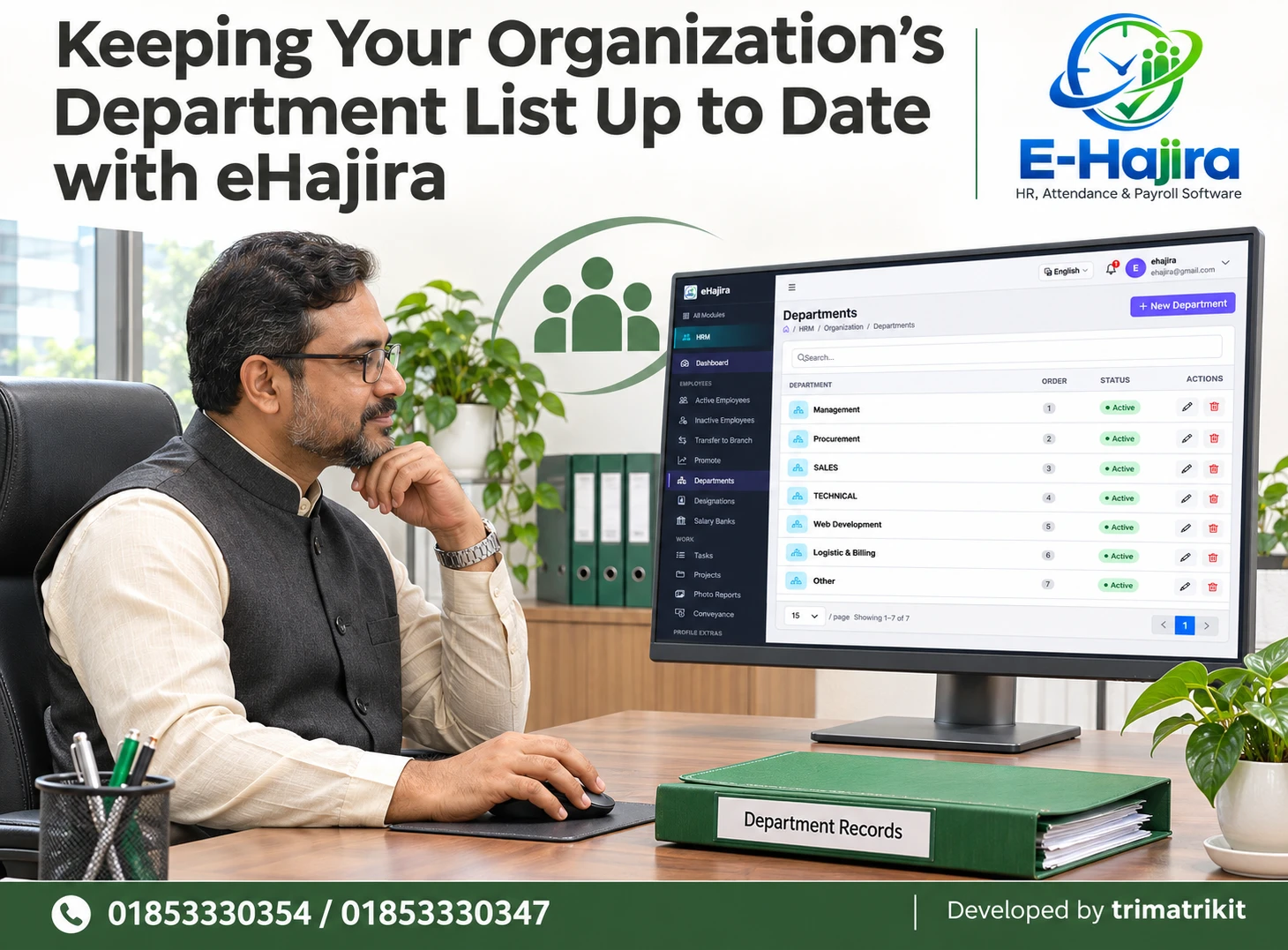
eHajira’s Departments page provides a dedicated place to review this organizational information. The supplied screen displays department names, an Order column, status labels, search, pagination, a New Department button, and row-level action controls.
This guide explains how organizations in Bangladesh can keep that list useful, review changes carefully, and distinguish department setup from employee assignments, reporting relationships, and operational rules.
Why an Accurate Department List Matters
Departments provide a way to organize employees around business functions. They help staff understand whether someone belongs to management, procurement, sales, technical operations, or another area.
When department information is inconsistent, routine tasks become harder. HR may struggle to prepare an accurate team list. A manager may select one department without realizing that related employees are assigned elsewhere. New employees may receive a category that no longer reflects the organization’s structure.
An accurate list gives administrators a shared reference. Its value comes from agreed meanings, appropriate employee assignments, and controlled updates. Creating department names is only the beginning; maintaining their usefulness is an ongoing responsibility.
The Bangladesh Business Context
A business in Bangladesh may begin with a small team handling several functions together. As it grows, procurement, billing, technical services, and sales may become separate responsibilities.
The organizational structure can therefore change faster than the administrative records. An old category may remain in use after a new team is established. Different branches may also develop their own terminology for the same function.
These are practical planning scenarios rather than claims about the frequency of such problems across the market.
The supplier’s published eHajira information describes the HRM module as a central area for employee information and identifies department and designation setup as part of that structure. Maintaining consistent department records supports that intended use.
What the eHajira Departments Screen Shows
The supplied Departments page sits within HRM and displays a table containing Department, Order, Status, and Actions.
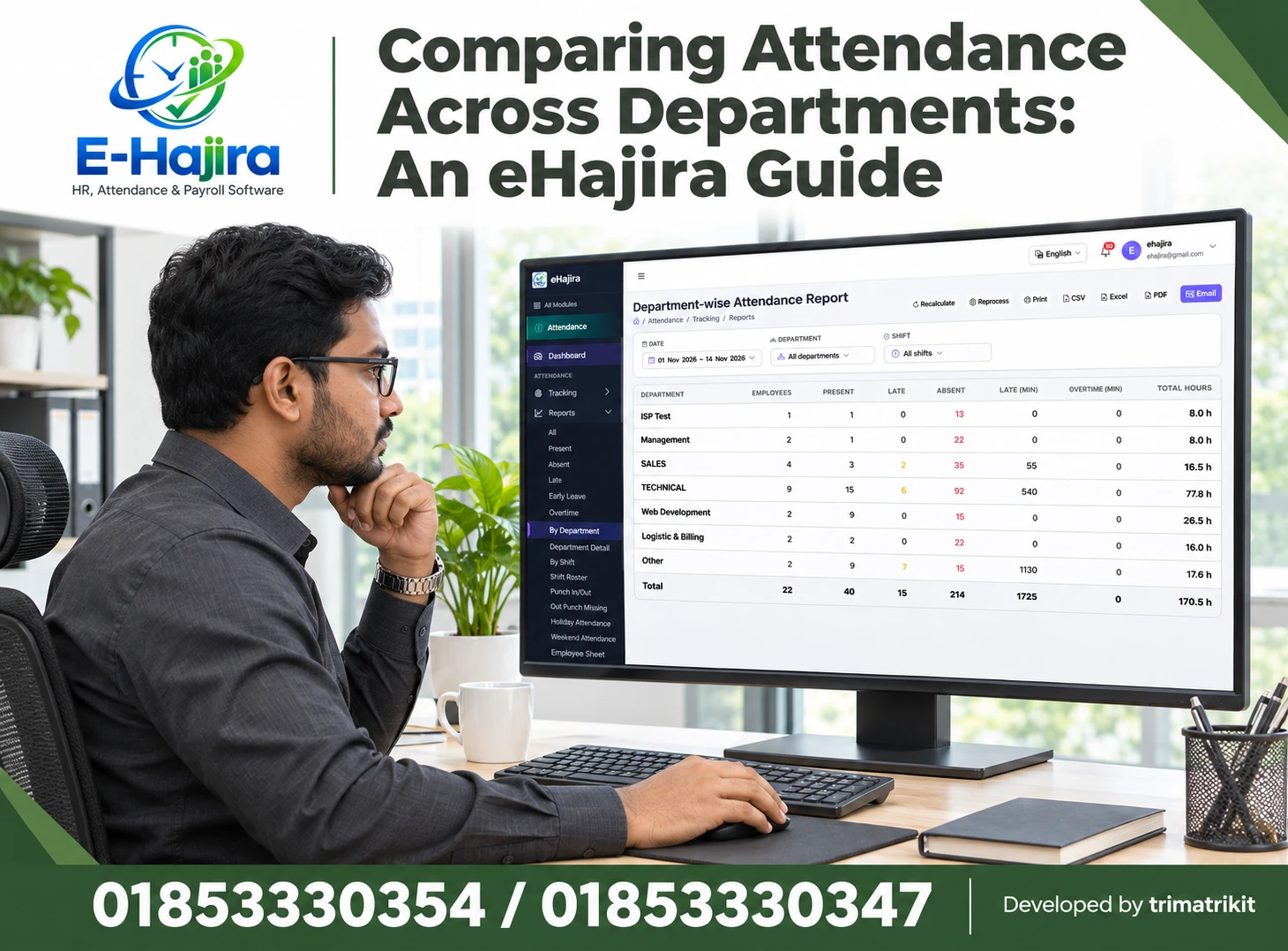
The visible example includes Management, Procurement, SALES, TECHNICAL, Web Development, Logistic & Billing, and Other. The Order values run from one to seven, and every displayed row has an Active label.
A search field appears above the table. A New Department button is available near the page heading. The Actions column contains edit and delete icons, while the bottom of the page provides page-size and navigation controls.
These are example records. They should not be treated as the required department structure for every organization.
Understand Departments and Designations Separately
A department and a designation answer different questions.
A department identifies the business function or organizational grouping. A designation identifies an employee’s position or title. For example, an employee might belong to the Technical department and hold the designation Senior Technician.
The eHajira sidebar displays Departments and Designations as separate areas. Administrators should preserve that distinction when preparing their organizational data.
Creating a department called “Senior Executive” simply because several employees have that title can make the structure confusing. Likewise, using “Sales” as a job title may be inappropriate if it is intended to represent the employee’s department.
Clear definitions make both lists easier to maintain.
Agree on Department Names Before Adding Records
Before entering a new department, establish the approved name and what it represents.
A useful name should be understandable to the people who will assign employees and review reports. It should also distinguish the function from other existing departments.
For example, a business may decide that Procurement covers purchasing activities, while Logistic & Billing combines two responsibilities under its current structure. Another organization may keep those functions separate. The correct choice depends on the approved operating model.
The goal is to represent the institution’s actual organization. Copying the names shown in a demonstration can create categories that have little relevance to the business using them.
Apply a Consistent Naming Convention
Consistency helps administrators recognize whether a department already exists.
Schools, offices, factories, and service companies may use abbreviations, English names, Bangla names, or combinations of these. Whatever approach is selected, it should be applied deliberately.
Differences in capitalization do not automatically prove duplication. However, names such as “Technical,” “TECHNICAL,” and “Technical Department” deserve review if users intend them to mean the same function.
The screenshot contains different capitalization styles. That is a reason to establish an organizational convention, not evidence that the displayed records are duplicates.
Choose the preferred spelling and format, then communicate it to everyone responsible for maintaining department information.
Search Before Creating a New Department
The New Department button should follow a review of the existing list.
Use search to investigate whether an appropriate department already exists under a full name, abbreviation, or alternative spelling. Confirm the search behavior in the application rather than assuming that every variation will match.
If the list spans several pages, review the relevant results and navigation. A department missing from the first page may still exist elsewhere.
Creating another record without checking can divide employee assignments between categories. The immediate entry may be quick, but resolving the resulting inconsistency can require a wider review of employee records and reports.
Distinguish a Rename from a New Organizational Function
A department rename and the creation of a new department are different administrative events.
If the same team continues performing the same function under a clearer name, editing the existing record may be appropriate. If the business creates a separate function with different responsibilities, a new record may be needed.
Before choosing either approach, consider how the application handles linked employees and historical reports. The screenshot does not establish whether renaming a department changes labels shown against earlier activity.
Management and HR should agree on the intended organizational meaning first. The software operation should then reflect that decision rather than determine it.
Review the Meaning of the Order Column
The supplied screen includes Order values beside department names. These values should be interpreted cautiously until their behavior is understood.
They may influence presentation in a list or selection control, but the screenshot does not prove exactly where that ordering applies.
An Order value should not automatically be treated as a department code, management rank, reporting level, or priority for approvals. Management appearing first does not establish a complete organizational hierarchy.
When testing eHajira, change a permitted example and inspect the relevant list or selection. Confirm what the field controls before building internal instructions around it.
Interpret Active Status Correctly
An Active department label indicates the record’s displayed status. It does not prove that employees are currently assigned to it or that the team is working at that moment.
A department may be active while awaiting new employees. Another may remain available for administrative reasons even when its staffing is temporarily zero.
The supplied screenshot does not show the available status options or the effects of changing them. Confirm whether an inactive department remains visible in employee profiles, appears in historical reports, or can be selected for new assignments.
This review helps prevent staff from confusing department availability with employee attendance or employment status.
Review Employee Assignments Alongside the List
A clean department list is useful only when employees are assigned appropriately.
After confirming the approved names, HR should compare employee records with the organization’s current responsibilities. An employee may be assigned to a department that was suitable earlier but no longer reflects their work.
Department maintenance and employee reassignment should be treated as connected but separate activities. Editing the department’s name does not necessarily move employees into another record.
Similarly, creating a new department does not establish that the intended employees have joined it. Use the appropriate employee-management process and verify the resulting assignments.
Keep Branches and Departments Distinct
A branch identifies an organizational location. A department identifies a function. Employees in several branches may perform the same function.
For example, a business might have Sales employees at both its head office and a regional branch. Creating “Head Office” as a department simply to distinguish location could mix two different classifications.
However, some organizations intentionally use branch-specific team structures. The important point is to establish what each field represents and how reports will interpret it.
The Departments screenshot does not establish whether records are shared across a workspace or restricted to particular branches. Confirm that scope before planning a multi-branch structure.
Review the Use of “Other”
The example list includes an Other department. Such a category can be useful when an organization has a genuine, agreed reason for it.
It can also become a place where incomplete assignments accumulate. If employees are routinely placed there because staff are unsure which department to select, the category may hide a data-quality problem.
HR should review the employees assigned to Other and determine whether the classification remains appropriate. Some may belong in an existing department; others may represent a newly established function.
Do not create unnecessary departments for every unusual responsibility. Use the approved organizational structure as the basis for decisions.
Handle Duplicate Departments Carefully
If two department records appear to represent the same function, investigate before removing either.
Compare their intended meaning, employee assignments, and any related use in reports or administrative processes. Similar names may occasionally represent genuinely different teams.
Where duplication is confirmed, determine which record should remain and how affected employees will be reassigned. The supplied screen does not show a department-merge function or describe deletion dependencies.
A supported correction process is preferable to assuming that deleting one row will combine the information. Review the outcome afterward to ensure employees remain correctly assigned and the intended reports can still be understood.
Plan Department Splits and Mergers
Organizational restructuring may involve separating one department into two or combining existing functions.
Suppose a business decides to separate billing from logistics. It needs to identify which employees belong to each new responsibility and when the new arrangement begins. Renaming the existing combined department would not, by itself, represent both groups correctly.
A merger presents a different problem. The business must decide how to classify employees and how to explain earlier reporting periods.
eHajira’s visible list does not demonstrate a dedicated restructuring workflow. HR should plan the organizational change, confirm the supported operations, and preserve an understandable record of the decision.
Check Reporting Effects Before Finalizing Changes
Department information may be used in employee filters and workforce summaries. The supplier’s eHajira information describes department-wise distribution and employee filtering within its HR-related views.
That makes report verification important after department changes.
Select a relevant employee view or report and compare the result with the intended assignments. Confirm how renamed or inactive departments appear and whether historical periods use current labels or stored values.
The exact behavior can vary by report. Do not assume that a correct-looking department list guarantees every summary is complete. Investigate the selected dates, filters, and population before interpreting totals.
Do Not Assume Automatic Changes to Payroll or Attendance
A department update can affect organizational classification without changing employment rules.
Renaming a department should not automatically be interpreted as changing salary, attendance schedules, leave approval routes, or software permissions.
The supplied screen contains no evidence that those settings are controlled by its Order or Status fields. If a restructuring also requires operational changes, coordinate them through the relevant eHajira areas.
For example, moving an employee into a technical team may require a different shift, but the department assignment alone does not establish that the shift has changed. Review each approved requirement and verify the final configuration.
Control Who Can Maintain Department Records
Department setup influences shared information, so editing authority should match actual responsibility.
An employee who needs to select a department during an authorized task may not need permission to create, rename, or delete department records.
OWASP’s authorization guidance supports granting only the access needed for a user’s work and reviewing permissions over time. Applied here, that means deciding who can maintain organizational reference data and testing whether configured restrictions work. This is a general security principle, not proof of a particular eHajira configuration.
Changes in staff responsibilities should trigger an access review. Former administrators should not retain unnecessary maintenance privileges simply because they once managed the list.
Review Deactivation and Deletion Separately
Making a record unavailable for future use and deleting it are different operations.
The screenshot shows status labels and a delete icon, but it does not demonstrate how either behaves. An organization should understand the consequences before closing an old department.
Investigate whether employees remain linked, whether the record appears in reports, and whether recovery is possible. If a department has historical significance, retaining a controlled record may be more appropriate than removing it.
A department should not be deleted merely because no current employee appears to use it. The relevant dependencies and retention needs must be understood first.
A Practical Bangladesh Business Example
Consider a hypothetical distributor with a head office and two regional branches. Over time, administrators have created several variations of the same sales department name.
HR compares those records with the approved structure and confirms which entries represent the same function. The team then agrees on one naming convention and investigates how employees are linked.
Using the supported correction process, authorized staff update the records and assignments. They review relevant workforce views afterward and explain the agreed naming convention to branch administrators.
This example illustrates a possible approach. It is not a customer case study or a claim that eHajira automatically merges duplicates.
Establish Ownership and a Review Schedule
A department list needs a clear owner. HR may maintain it, while management approves organizational changes.
The organization should define how a new department is requested, who verifies its name, and who confirms employee assignments. A simple record of the reason and approval can help explain later changes.
Reviews can take place at a suitable interval and after significant restructuring. They should focus on duplicate names, unclear categories, outdated status, and assignments that no longer match responsibilities.
Measure improvement using the organization’s own experience, such as fewer correction requests or less time resolving classification differences. Avoid unsupported promises of guaranteed accuracy or percentage savings.
Frequently Asked Questions
1. What does the Departments page do in eHajira?
It provides a dedicated list of department records. The supplied screen shows names, Order values, status labels, search, and action controls. Employee assignment and other organizational processes should be reviewed in their relevant areas.
2. Is a department the same as a designation?
No. A department represents a function or organizational group, while a designation identifies a position or title. An employee can belong to Technical and hold the designation Senior Technician.
3. Should every organization copy the demonstration departments?
No. The visible records are examples. Use names that reflect your approved business structure. Unnecessary categories can create confusion and make employee assignment harder.
4. Why should staff search before adding a department?
The function may already exist under another spelling or abbreviation. Reviewing existing records reduces accidental duplication. Confirm the intended meaning before deciding whether another department is necessary.
5. Do different capital letters always mean duplicate records?
No. Capitalization alone does not establish duplication. Compare the business meaning and assignments. Where names represent the same function, adopt an agreed convention and follow the supported correction process.
6. What should happen before a department is renamed?
Confirm whether the change is a name correction or a new organizational arrangement. Review linked employees and historical reporting behavior. Obtain the appropriate approval before updating shared information.
7. Does Order represent management hierarchy?
The screenshot does not establish that. It displays numeric values, but their exact effect requires testing. Do not use Order as proof of authority, seniority, or reporting relationships.
8. Does Active mean employees are assigned?
Not necessarily. It is the displayed department status. Employee count and assignment are separate questions. Review the relevant employee records to confirm who belongs to the department.
9. Does an Active department prove staff attendance?
No. Department status is not daily attendance information. Presence, absence, shifts, and leave must be reviewed through their respective records and rules.
10. Can a department be made inactive?
The screen shows a status column but not its editing options. Verify available states and their effects. Understand selection availability and reporting behavior before changing a department’s status.
11. Does creating a department assign employees automatically?
That behavior is not shown. After creating an approved record, use the appropriate employee-management process and verify assignments. A department name existing in the list is not proof of staffing.
12. Is a branch the same as a department?
No. A branch generally identifies location, while a department identifies function. Keep the two classifications clear unless the organization has an explicitly designed alternative structure.
13. Are department records shared across all branches?
The screenshot does not establish their scope. Confirm workspace and branch behavior during implementation. This helps avoid creating unnecessary branch-specific duplicates.
14. Should an Other department be removed?
Not automatically. Review why it exists and who is assigned to it. It may serve a valid purpose, but it should not conceal unresolved classifications or become a substitute for proper review.
15. Can duplicate departments be merged?
A merge function is not visible in the supplied screen. Confirm supported options with the implementation team. Investigate related assignments before deleting or attempting to consolidate records.
16. What if one department splits into two?
Plan the new responsibilities and identify affected employees first. Confirm the supported record and reassignment processes. Verify both current assignments and the interpretation of earlier reports.
17. Does changing a department update salary?
No automatic salary behavior is established here. Compensation changes require their own approved process. Review relevant payroll settings separately when organizational changes also affect pay.
18. Will employee shifts change with their department?
Do not assume so. Department assignment and shift assignment are different information. Confirm the intended roster and review the actual configuration after any related change.
19. Who should edit department records?
Authorized users responsible for maintaining the organization’s structure. Viewing or selecting a department does not necessarily justify permission to create, rename, or delete it. Test configured access boundaries.
20. Is deleting a department the same as deactivating it?
No equivalence is shown. The effects may differ substantially. Investigate linked employees, reports, history, and recovery options before choosing either operation.
21. What should administrators check after an update?
Review the saved department record, affected employee assignments, and relevant reports or selection controls. Confirm that the intended change occurred and that unrelated information remains correctly classified.
22. How should an organization begin improving its list?
Compare existing records with the approved structure, investigate duplicates, and agree on naming ownership. Test uncertain behavior with controlled examples before applying wider changes. Review the list regularly afterward.
Maintain a Department List Your Team Can Trust
eHajira’s Departments page gives administrators a focused place to review department names, order, and status. Its usefulness depends on clear definitions and information that matches the organization’s actual structure.
Agree on names, distinguish departments from designations and branches, and verify employee assignments after changes. Understand the effects of renaming, deactivation, and deletion before using them.
To discuss department setup in eHajira or arrange a demonstration for your organization, contact 01853330354 / 01853330347.
Recent Post