EAS Security
 EAS Gate
 Security Tag
 EAS Accessories
 Gadgets
 Convex Mirror
 Road Barrier
 Burglar Alarm
 Calling System
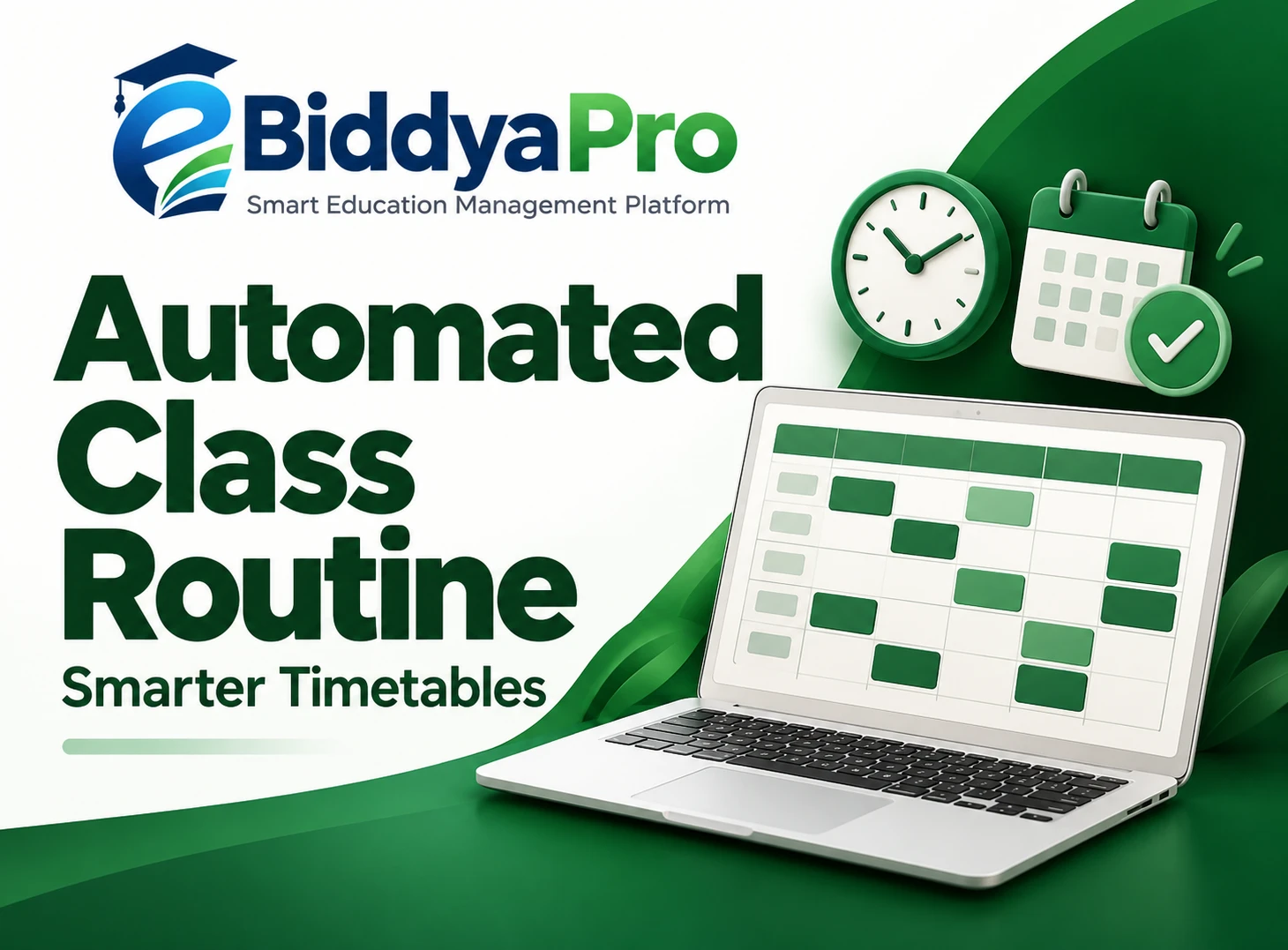
Organizing Class Schedules Across School Branches with eBiddyaPro
November 10, 2026

Organizing Class Schedules Across School Branches with eBiddyaPro
A class timetable must answer several questions at once. Which students should attend? Who will teach them? Which subject comes next? Where will the lesson take place? When does the period begin and end?
For a school operating several branches, those questions become more complicated. Different campuses may have different classrooms, teachers, sections, and operating hours. A timetable that works at one branch may create practical problems at another.
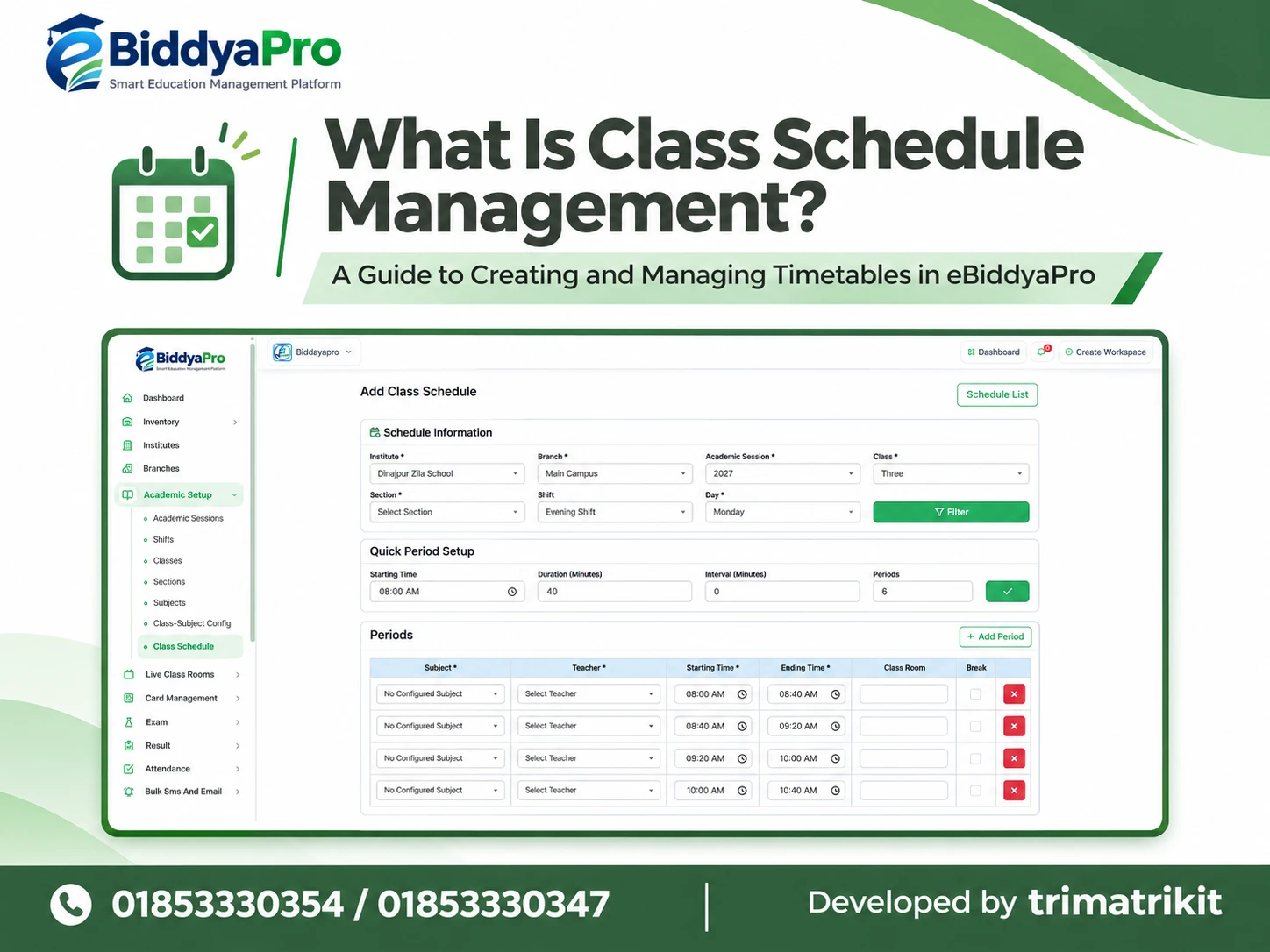
eBiddyaPro’s Add Class Schedule screen provides a structured way to enter the academic context and period details behind a timetable. The supplied interface includes institute, branch, academic session, class, section, shift, and day selections. It also includes Quick Period Setup and individual period fields for subjects, teachers, times, classrooms, and breaks.
This guide explains how Bangladesh schools can use these controls thoughtfully, coordinate branch requirements, and review schedules before putting them into operation.
Why Branch-Level Class Scheduling Matters
A school group needs consistency across its branches, but consistency does not require every branch to operate an identical timetable. The academic objectives may be shared while the available rooms, teaching arrangements, and daily opening times differ.
For example, one campus may have a dedicated science laboratory, while another shares a practical room between several classes. A teacher may work at more than one branch. A morning section may need to finish before another group enters the building.
These differences affect whether a timetable is workable. By selecting the branch alongside the class, section, session, and day in eBiddyaPro, administrators can establish the intended context before entering lessons. This reduces ambiguity about which group a schedule is meant to serve.
The Bangladesh School Management Context
In Bangladesh, scheduling decisions may involve Bangla-medium schools, English-version sections, private institutions, and school groups with multiple campuses. Each institution must consider its own academic requirements and applicable instructions when allocating teaching time.
UNESCO’s Bangladesh school leadership profile identifies school timetable preparation as part of the academic administration responsibilities discussed for school heads. This supports treating timetable preparation as an academic management task that needs oversight, rather than simply a data-entry exercise.
School leaders should therefore approve the educational structure before administrative staff finalize entries in eBiddyaPro. The software can organize the information, while the institution remains responsible for the suitability of teaching arrangements.
What the eBiddyaPro Screen Shows
The Add Class Schedule screen is divided into Schedule Information, Quick Period Setup, and Periods.
Schedule Information identifies the timetable’s context. Quick Period Setup contains Starting Time, Duration in Minutes, Interval in Minutes, and the number of Periods. The Periods area contains individual rows where subjects, teachers, starting times, ending times, classrooms, and break selections can be reviewed.
The supplier’s practical eBiddyaPro guide also describes routine management in terms of lesson schedules, teacher assignments, classrooms, and periods. The supplied screen provides a more specific view of those scheduling inputs.
However, the image does not establish automatic conflict detection, approval workflows, parent notifications, or timetable publishing behavior. Those capabilities should be verified separately during a demonstration.
Start with the Correct Institute and Branch
Selecting the correct institute and branch establishes where the timetable belongs. This is particularly important when a school group uses similar class names across several campuses.
“Class Six, Section A” may exist at both the main campus and a second branch. Without the branch context, an otherwise accurate timetable could be associated with the wrong group.
Schools should use clear, consistent branch names in their academic setup. Names that closely resemble each other can increase selection mistakes. Before entering periods, the administrator should confirm that the selected branch matches the approved planning document and the campus where the lessons will take place.
Keep Academic Sessions Separate
Academic Session is another required selection on the supplied screen. It helps distinguish schedules belonging to different academic periods.
A school should avoid treating a previous session’s timetable as automatically suitable for the next one. Teacher assignments, section structures, subject arrangements, and room availability may change between sessions.
When preparing a new timetable in eBiddyaPro, administrators should confirm the selected session before continuing. They should also understand how the institution will retain and reference earlier schedules. The screenshot does not show whether schedules can be copied between sessions or how historical versions are maintained.
Match the Class and Section Carefully
Class and section selections define the student group for the schedule. These fields deserve individual attention because sections within the same class may follow different arrangements.
Two sections might study the same subjects but use different teachers or classrooms. One section may have an additional activity at a different time. Assigning a timetable to the wrong section can therefore create confusion even when the overall subject sequence looks reasonable.
In eBiddyaPro, administrators should compare the selected class and section with the institution’s approved grouping. Similar section labels across branches should always be interpreted within the selected branch and academic session.
Understand the Shift Selection
The supplied screen includes a Shift field, currently displaying “No Shift.” That is a displayed selection, not an instruction that every school should use it.
Where a school organizes students into morning and day shifts, the timetable should match the intended group and operating hours. Where shift separation is not used, the appropriate configuration should be confirmed with the implementation team.
UNESCO’s education planning glossary describes a double-shift system as serving separate groups of pupils during a school day. That distinction explains why a shift can be an important scheduling context, although it does not prescribe any particular arrangement for a Bangladesh school.
Choose the Day Before Allocating Lessons
The Day field establishes which weekday the timetable concerns. Saturday appears in the supplied example, but schools should select days according to their actual academic arrangements.
A timetable should reflect the institution’s applicable calendar and operating decisions. The weekday shown in a demonstration should not be interpreted as a universal requirement for schools in Bangladesh.
Administrators should also distinguish a recurring weekday schedule from a date-specific exception. The screen shows a day selector, but it does not explain how holidays, special events, or temporary replacement routines are handled. Those situations need a clear institutional process.
Use the Filter Control with a Clear Purpose
The Schedule Information section includes a Filter button. Administrators should complete the relevant selections before applying it.
If subjects or other choices do not appear as expected, the first step is to recheck the institute, branch, session, class, and section. An incorrect selection can make the available information appear incomplete.
The exact effect of Filter should be confirmed in the working application. It should not be assumed to save the timetable or publish it. Loading the appropriate scheduling context and committing a finished schedule are different actions.
Plan Period Times with Quick Period Setup
Quick Period Setup can provide a starting structure for the school day. In the screenshot, the starting time is 8:00 AM, duration is 40 minutes, interval is zero, and the period count is five.
The displayed rows run from 8:00–8:40 AM through 10:40–11:20 AM. This illustrates a sequence of five consecutive 40-minute periods.
Schools should treat these values as an example. The correct duration and period count depend on the institution’s approved arrangements. After using the setup controls, administrators should review the resulting rows rather than assuming that the initial structure is ready for use.
Distinguish Intervals from Break Periods
An interval between periods and a designated break row may serve different purposes. The screen provides both an Interval field and a Break selection within period rows.
Before using either, the school should understand how eBiddyaPro interprets them. An interval might create spacing between lessons, while a break selection might identify a particular row as non-teaching time. The screenshot alone does not confirm the precise behavior.
This matters when calculating the end of the school day. A timetable containing teaching periods, transitions, and a longer break must account for each component without accidentally creating duplicate gaps or overlapping times.
Resolve “No Configured Subject” Before Assigning Lessons
The subject fields in the supplied example display “No Configured Subject.” Administrators should resolve that condition before treating the timetable as complete.
The sidebar also includes Class-Subject Config. That is a relevant place to investigate whether subjects have been associated with the intended academic group. The selected institute, session, class, and other context should also be checked.
The message does not necessarily mean the institution has no subjects anywhere in the system. It may relate to the current selection or configuration. A useful review begins by confirming the context and then checking the available subject setup.
Assign Teachers Against Real Availability
Selecting a teacher for each lesson creates a named teaching assignment. It does not, by itself, prove that the teacher can attend.
Schools should compare each assignment with the teacher’s other classes, responsibilities, and availability. This is especially important where a teacher works across sections or campuses.
For example, a teacher finishing a lesson at one branch at 9:20 AM cannot necessarily begin another lesson at a distant branch at the same time. Travel and transition time must be considered. Unless automatic cross-branch conflict checks have been demonstrated, the institution should maintain its own consolidated teacher review.
Give Classrooms Clear Branch-Specific Names
The Class Room field helps identify where a period will take place. Consistent room naming makes this information more useful.
A name such as “Main Campus, Room 201” is easier to interpret across a school group than an unexplained “201.” Laboratories and specialist teaching spaces should also be identified clearly.
Room allocation requires more than a name. Administrators should confirm capacity, equipment, accessibility, and availability. Entering a classroom in eBiddyaPro should not be treated as evidence that the room is suitable or unoccupied unless the relevant validation has been verified.
Review Subject Coverage Across the Week
A daily timetable can look balanced while the complete week contains an uneven distribution of subjects.
Academic coordinators should review the combined weekly allocation for each class and section. They should compare the number and length of subject sessions with the institution’s applicable academic requirements and approved teaching plan.
eBiddyaPro’s period-level subject entries provide the information needed for this review, but the supplied screen does not show an automatic curriculum compliance calculation. Schools should therefore establish who will review weekly coverage and how corrections will be communicated before the timetable becomes operational.
Coordinate Shared Teachers Across Branches
A multi-branch institution benefits from a consolidated view of teachers who serve more than one location.
Consider a hypothetical school group with campuses in Dhaka and nearby areas. A mathematics teacher may teach at one branch during the first part of the day and another later. Each branch could prepare a locally sensible schedule that becomes impossible when combined.
The coordinating academic officer should compare both timetables, including travel and preparation time. This is a planning example, not a claim about a particular eBiddyaPro customer or an automatic feature. The purpose is to show why branch-level entry still requires institution-level coordination.
Separate Draft Entry from Operational Approval
An entered timetable should not become the school’s working routine merely because the fields have been completed.
The institution should define how academic approval is recorded and who confirms readiness. A branch administrator might prepare the entries, while an academic coordinator reviews teacher availability and subject allocation.
The supplied screenshot does not show an approval status or publishing control. Schools can still follow an internal approval process, but they should verify whether that process is supported within eBiddyaPro or maintained through another approved method. Everyone should know which version is authorized for use.
Manage Timetable Changes Clearly
Schedules may need revision after a teacher changes duties, a classroom becomes unavailable, or a section is reorganized.
When changing a routine, administrators should identify the affected branch, class, section, day, and periods. They should then review related teacher and room arrangements before distributing the revised instructions.
The screenshot does not establish effective dates, version history, or automatic notifications. Schools should confirm those capabilities and maintain a reliable way to distinguish the old timetable from the replacement. Clear communication is essential because a correct database entry is useful only when the people following it understand the change.
Introduce eBiddyaPro Scheduling Gradually
A practical implementation can begin with one branch, one class, and a limited set of days. This allows the school to test its academic setup and understand how the controls behave.
The team can compare the saved result with the approved timetable, check subject availability, and review teacher and classroom selections. Once the process is understood, the institution can expand to additional sections and branches.
Schools should measure results using their own experience. Preparation time, correction frequency, and scheduling conflicts can be compared before and after implementation. Percentage improvements should only be claimed when supported by actual institutional measurements.
Frequently Asked Questions
1. What is Add Class Schedule in eBiddyaPro?
It is the screen used to enter the academic context and period details for a class timetable. The supplied interface includes branch, session, class, section, shift, day, subjects, teachers, times, classrooms, and breaks.
2. Why does the branch selection matter?
Different branches may have different teachers, rooms, and operating arrangements. Selecting the correct branch helps associate the timetable with the intended campus. Class and section names should always be interpreted within that branch context.
3. Can branches follow different timetables?
The screen includes a branch selection that supports identifying branch-specific scheduling context. How separate schedules are saved and managed should be verified in the application. Academic leaders should approve any differences between branch routines.
4. Does every branch need identical period lengths?
Not necessarily. The institution must consider its applicable academic requirements and approved operating arrangements. Quick Period Setup contains a duration input, but the screenshot does not establish whether any institution-wide restrictions are configured.
5. What does Academic Session identify?
It identifies the academic period associated with the schedule. Selecting the correct session helps avoid placing new arrangements under an earlier academic context. Schools should review teacher and subject assignments when preparing another session.
6. Why are class and section separate fields?
Sections within the same class may have different teachers, rooms, or lesson sequences. Separate selections help identify the exact student group. Administrators should verify both fields before assigning subjects and period times.
7. What does “No Shift” mean?
It is the current value displayed in the Shift field. Its suitability depends on the school’s configuration. Schools using morning or day groups should confirm the appropriate shift selection rather than copying the demonstration value.
8. Does selecting Saturday establish the school week?
No. Saturday is simply the displayed day in the example. Administrators should choose days according to their institution’s applicable calendar. The screenshot does not establish a required weekly operating pattern for Bangladesh schools.
9. What is Quick Period Setup?
It contains inputs for the starting time, period duration, interval, and period count. These provide a structure for preparing period rows. Schools should review the generated or updated result before completing subject and teacher assignments.
10. Are the displayed 40-minute periods mandatory?
No. They are example values shown in the supplied screen. A school should use the period length approved for its academic arrangements. It should also review the resulting end time and total teaching time.
11. Does an interval automatically become a break?
That behavior is not established by the screenshot. Interval and Break are separate controls. Administrators should test how each affects the timetable and ensure that non-teaching time is represented consistently without duplicate gaps.
12. Why does a subject field show “No Configured Subject”?
The current scheduling context may not have subjects available through its configuration. Administrators should check their selections and investigate Class-Subject Config. The message alone does not prove that the entire institution has no subjects.
13. Can a teacher be assigned to multiple sections?
A teacher may have responsibilities across several sections, but assignments must be compared for time conflicts and workload. The supplied screen does not confirm automatic overlap prevention. Schools should verify validation behavior during testing.
14. Does eBiddyaPro automatically detect teacher conflicts?
The screenshot does not demonstrate this capability. Ask for a test involving overlapping assignments, including different branches. Until the behavior is verified, use a consolidated teacher availability review as part of timetable preparation.
15. How should shared classrooms be managed?
Use clear room names and compare allocations across classes using the same space. Consider capacity and specialist equipment as well as timing. A room entry should not be treated as a confirmed reservation without checking system behavior.
16. Can additional periods be entered?
The supplied screen includes an Add Period button. Administrators should confirm how new rows are inserted and timed in the working application. After adding a row, review the sequence and any affected teacher or classroom assignments.
17. What happens when a period row is removed?
Each displayed row has a removal control, but the screenshot does not explain subsequent timing behavior. Check whether remaining times change or stay fixed. Review the entire day after removing a lesson or break.
18. Does the Filter button save the timetable?
Its label should not be interpreted as a save instruction. Verify its actual function in the application. Schools should identify the final save action and confirm the persisted result before treating the schedule as complete.
19. Does the timetable automatically notify parents?
No notification behavior is shown here. Timetable distribution through portals, SMS, email, or other channels must be verified separately. Schools should establish a communication method that reaches the intended teachers, students, and guardians.
20. Can a class schedule prove student attendance?
No. A timetable records planned teaching arrangements. Attendance records whether students actually attended. Schools should review the relevant attendance information rather than assuming that a scheduled lesson proves participation or teacher presence.
21. Should last session’s timetable be reused unchanged?
Only after a full review. Teachers, rooms, sections, and subject arrangements may have changed. Whether eBiddyaPro supports copying schedules should be verified separately. Any reused structure still needs approval for the new session.
22. What should a school test before expanding to all branches?
Test academic selections, subject availability, period timing, teacher assignments, room entries, saving, and retrieval. Include realistic cross-branch scenarios. A successful small implementation gives administrators a clearer process before they prepare the institution’s complete timetable.
Plan Your Branch Timetables with eBiddyaPro
A dependable class schedule connects academic requirements with available teachers, classrooms, and teaching time. eBiddyaPro’s Add Class Schedule screen provides a structured place to enter those relationships for a defined branch and student group.
Start with accurate academic setup, review the complete weekly allocation, and coordinate shared resources across campuses. Confirm the saved timetable against the approved plan before staff and students begin following it.
To discuss eBiddyaPro class scheduling for your school or arrange a demonstration, contact 01853330354 / 01853330347.
Recent Post